

Use this MCP while you build. It lets your coding assistant pull live OpenRouter info (which models exist, what they cost, your credit balance) and send quick test messages, without leaving your editor. To actually run models in your app, keep calling the OpenRouter API directly.
Connect your agent
- Claude Code
- Codex CLI
- OpenCode
- Cursor CLI
- Claude Desktop / Web
/mcp, select openrouter, and click Authenticate.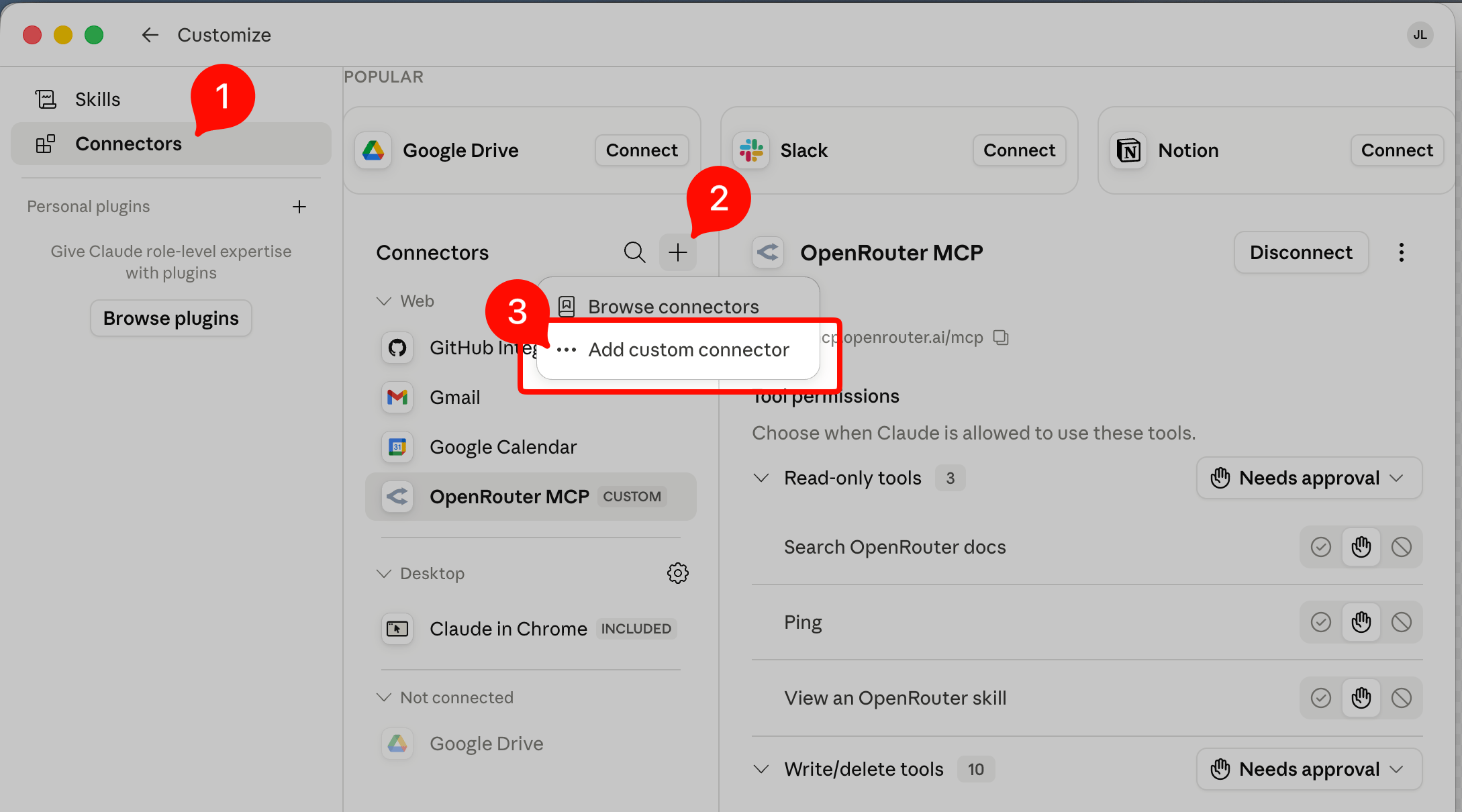
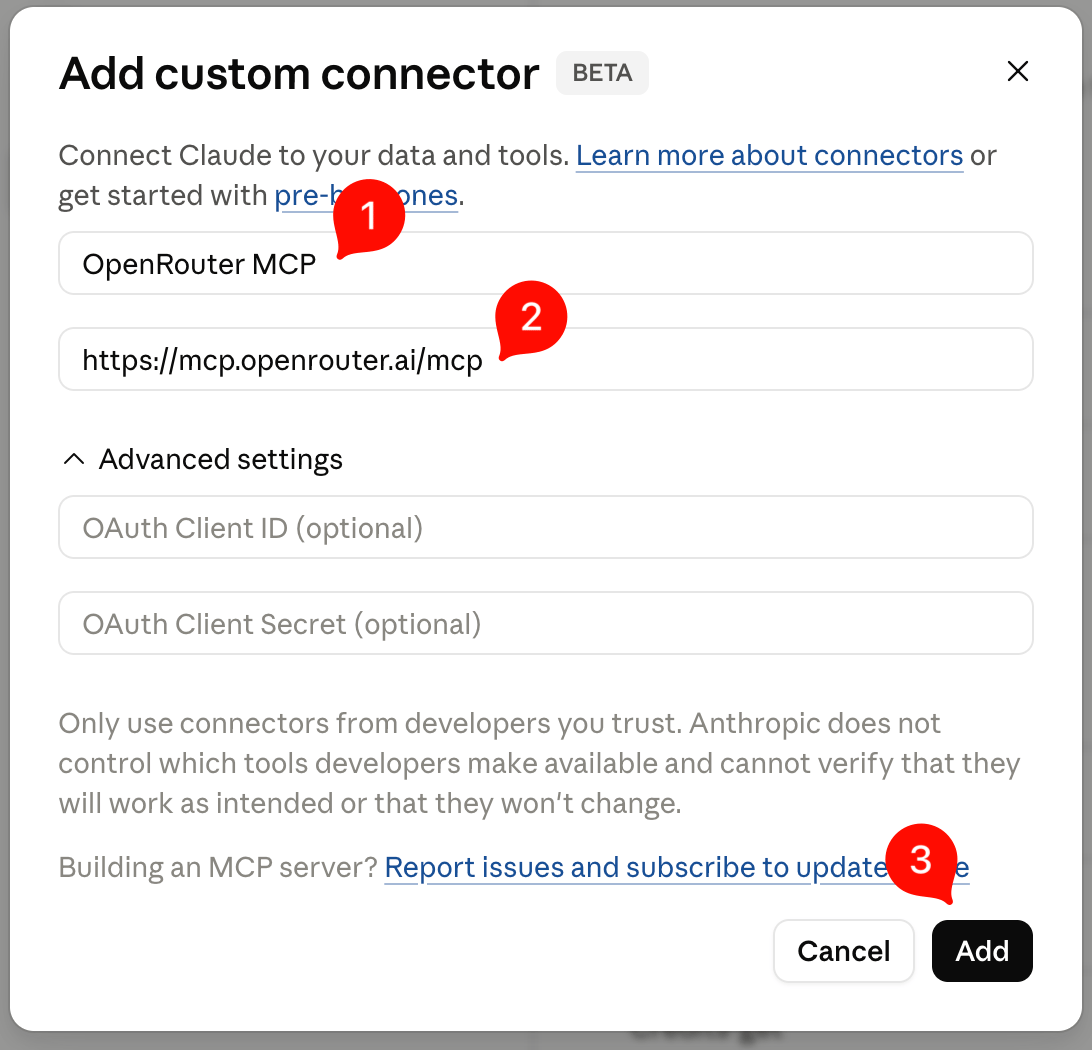
$10 spend cap (editable on the approval screen). You can disconnect anytime.
What you can do
The MCP exposes these tools. Most are read-only lookups against live OpenRouter data. The exceptions:send-message and generate-image make billable inference calls, and send-feedback writes feedback on one of your own generations.
Pick the right model for a task
You describe a task and the assistant recommends a model for it, and the recommendation is backed by live data, not the model’s stale training knowledge.send-message is grounded so the assistant won’t name a model from memory; for any “which model should I use” question it defers to the live list-benchmarks, list-daily-model-rankings, and list-models tools. The right pick might be the cheapest, the smartest, the fastest, a specific modality, or a particular provider.
By task and trade-off:
- “What’s the best model for coding right now?”
- “Smartest model for hard reasoning, money no object?”
- “Best value model for summarizing long documents?”
- “What embedding models are available, and which is best?”
- “Do you support reranking models? Recommend one.”
- “Best text-to-speech model? What about speech-to-text?”
- “Which model tops the Artificial Analysis intelligence index?”
- “What’s the best model for landing page design?”
- “Recommend a model and tell me which provider to route to.”
More things you can do
- “How much credit do I have left on OpenRouter?”
- “Which apps send the most traffic to OpenRouter?”
- “How do I pin a model to a specific provider, e.g. Bedrock?”
- “Send a test message to GPT-5.5 and tell me what it cost.”
- “Compare the answers for the same prompt across Opus 4.8, DeepSeek v4 Pro, Gemini 3.5 Flash, and GLM-5.2.”
How it works
- Discovery & auth. An unauthenticated request returns a
401that points your client to OpenRouter’s OAuth authorization server. The client registers, you approve the consent page, and a token is issued via PKCE. - Dedicated key. The issued token is a standard OpenRouter API key labeled
OpenRouter MCP: <app name>, minted with a 7-day expiry and a$10default spend limit so you can find and revoke it from your dashboard. - Live data, no local state. Tools proxy the public OpenRouter API with your key. Nothing is installed locally, and no source code is sent anywhere unless you call
send-message,generate-image, orsend-feedback.
Troubleshooting
- Tool calls fail with an auth error. Re-run the authenticate step for your client. The key may have expired (7-day lifetime) or been disconnected.
- The login didn’t pop automatically. That’s expected for some clients. Trigger it with the per-client step above.